How to Get Rid of Mangago Ads: A Practical Guide
Discover safe, legal ways to reduce Mangago ads using trusted ad blockers, privacy settings, and optional ad-free options. This guide covers practical steps, tools, risks, and best practices for a smoother manga-reading experience.


Use a trusted ad blocker, enable privacy protections in your browser, and consider an official ad-free option if Mangago offers one. Start with a reputable extension, keep it updated, and avoid sketchy tools that install malware or steal data. This quick approach emphasizes safety, legality, and user control while reducing intrusive ads.
Understanding Mangago Ads: How they work and what they monitor
Ads on manga sites like Mangago are typically served by third-party ad networks that rely on scripts and cookies to tailor content, track user behavior, and generate revenue. This means some ads may feel intrusive or base their targeting on your browsing patterns. According to WikiManga. analysis, many readers experience these ads across devices, which can slow pages and degrade the reading flow. The goal of this section is to demystify how ads appear so you can choose safer, lawful strategies to reduce them while preserving a good reading experience.
Safety and legality: what you can and cannot do
Blocking ads is a common practice among readers who want a cleaner browsing experience. It is generally legal to use ad blockers on your own devices, but you should review Mangago’s terms of service and any app store policies. WikiManga. team emphasizes sticking with reputable tools from official sources to avoid malware or data leakage. Never install software from untrusted sites or sign up for tools that promise to remove ads but exfiltrate data or install unwanted programs. This keeps your devices secure while you enjoy manga content.
Quick, low-risk fixes you can try today
Before making major changes, you can reduce distractions with simple steps: enable your browser’s built-in tracking protection, turn off auto-play videos, and use reader-friendly modes when available. These actions reduce data loaded on each page and often noticeably improve load times. WikiManga. analysis finds that readers who enable privacy features and use reputable tools report a smoother manga-reading experience with fewer interruptions.
The right tools: selecting ad blockers and filters
The most effective approach uses reputable ad blocker extensions and widely-supported filter lists. Popular options include open-source blockers that let you customize what to block and what to trust. Always install from official stores and keep them updated. Using filter lists such as EasyList and EasyPrivacy helps target ads while preserving essential site content. For Manga sites, block intrusive overlays while allowing article content and images to load cleanly, ensuring you still enjoy the manga pages.
How to install and configure: a practical setup guide
A solid setup starts with choosing a trusted blocker, enabling anti-tracking, and applying standard filter lists. After installation, you should review per-site settings and consider whitelisting only trusted features that Mangago relies on (e.g., site navigation). This keeps core functions accessible while reducing ads. WikiManga. team recommends performing a quick test on multiple pages to ensure you’re not breaking essential features such as image galleries or navigation menus.
Mobile considerations: ad-blocking on phones and tablets
Mobile browsers support content blockers and privacy extensions, especially on iOS with content blockers and on Android with compatible browsers. If Mangago is accessed via mobile, enable a blocker within the browser or install a compatible privacy app. Be mindful that some blockers may interfere with in-app content or e-reader features, so test on a few pages to balance readability and functionality.
Alternatives and paid options: when to consider official ad-free access
If Mangago or its partners offer an official ad-free plan or app, this is often the simplest, safest route to a clean reading experience supporting the site. Official options reduce risks associated with third-party extensions and malicious tools. Consider trying a trial if available, and compare the trade-offs between gain (ads removed) and cost (subscription fees) to pick the best fit for your manga habit.
Troubleshooting and pitfalls: what to watch out for
If ads persist after installing blockers, revisit lists and settings, ensure you updated extensions, and check for site-specific blocks. Some sites detect blockers and adapt; in such cases, temporarily disabling aggressive filters on Mangago or consulting the site’s help page can help. Always re-scan your system for malware if you notice unexpected redirects or pop-ups, and avoid obscure tools that promise rapid ad removal but compromise security.
Tools & Materials
- Ad blocker extension (e.g., uBlock Origin)(Install from official store; enable EasyList + EasyPrivacy; review per-site rules.)
- Privacy-focused browser / add-ons(Use a browser with built-in anti-tracking features (e.g., Firefox with Enhanced Tracking Protection).)
- Privacy protection or script-control extension(Optional: Privacy Badger or NoScript if you understand site protections and can manage permissions.)
- Official ad-free option (if offered)(Check Mangago or partner sites for legitimate ad-free trials or subscriptions.)
- Malware scanner(Optional: run a quick scan after installing extensions or software from third-party stores.)
Steps
Estimated time: 30-60 minutes
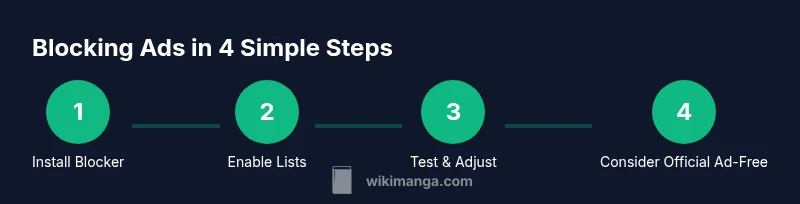
- 1
Install a trusted ad blocker
Choose a reputable extension from the official store and install it in your browser. This is the foundational step to reduce many intrusive ads. After installation, enable commonly-used lists like EasyList and EasyPrivacy for broad coverage.
Tip: Verify the extension is from the official source and update it immediately after installation. - 2
Enable anti-tracking and filter lists
Turn on anti-tracking protections and ensure the blocker lists are active. These lists help prevent trackers from loading, which can indirectly reduce ad complexity and page clutter.
Tip: Regularly check for list updates and review privacy settings in your blocker’s dashboard. - 3
Test Mangago and adjust per-site rules
Visit Mangago with the blocker active and look for overlays, pop-ups, or banner ads. If something blocks essential site features, refine the per-site rules to allow essential scripts while still blocking intrusive elements.
Tip: Keep a whitelist for navigation and image-loading components to preserve usability. - 4
Consider a privacy-focused browser mode
Enable a Private or Shield mode that blocks third-party cookies and cross-site trackers. This can dramatically improve load times on manga pages and reduce retargeted ads.
Tip: Test both standard and private modes to see which offers the best balance of speed and usability. - 5
Explore official ad-free options if available
If Mangago or a partner offers an ad-free plan, evaluate cost versus benefit. Subscriptions can provide a reliable, safe, and uninterrupted reading experience.
Tip: Check trial periods and cancellation terms before committing.
Frequently Asked Questions
Is it legal to block Mangago ads?
In most regions, using ad blockers on sites you visit is legal, but it may violate some sites’ terms of service. Always review Mangago’s terms and the policies of any apps you use. For readers, the safest approach is to use reputable tools from trusted sources.
Blocking Mangago ads is generally legal, but check the site’s terms and your local rules. Use trusted tools from reputable sources to stay compliant and safe.
Will ad blockers break Mangago functionality?
Sometimes. Some scripts power essential features, so you may need to adjust per-site exceptions. If core functionality stops, disable blocking for that site temporarily and reload.
Sometimes blockers affect site features. If that happens, tweak the settings or disable blocking for Mangago while keeping protection elsewhere.
Can I still access Mangago with ad blockers on?
Yes, most users can access Mangago with ad blockers enabled. If content won’t load, try whitelisting the site or testing a different blocker configuration. Always ensure you’re on the legitimate Mangago domain.
Yes, you can usually access Mangago with blockers. If something fails, adjust settings or whitelist the site.
What about ads on mobile devices?
Mobile ad blocking works differently; some browsers support content blockers, while others rely on built-in privacy features. Check your device’s settings and use compatible blockers or privacy apps designed for mobile browsers.
On mobile, use blockers compatible with your browser. Some settings may differ, but you can still reduce ads effectively.
How do I whitelist Mangago in an ad blocker?
Open the blocker’s dashboard, locate the per-site rules or whitelist, and add mangago.to or the exact Mangago domain. Save changes and refresh the page to see the effect.
Go to the blocker settings, add Mangago to the whitelist, save, and reload the site.
Are there risks with ad blockers?
Yes. Poorly configured blockers can disable important content or expose you to misleading ads via compromised extensions. Use trusted extensions and avoid unverified tools. Regularly review settings.
There are risks if you misconfigure blockers, so use trusted tools and review settings often.
Watch Video
Highlights
- Identify intrusive ads and separate them from essential site features.
- Use reputable ad blockers with trusted filter lists to reduce clutter safely.
- Test per-site rules and whitelist only necessary components for Mangago.
- Consider official ad-free options if offered for a safer, maintenance-free experience.