How to Put Pictures in TikTok Comments: Alternatives for Visual Sharing
Learn why TikTok comments can't host images and explore practical workarounds to share visuals, especially for manga creators and content creators who want to reference pictures in their interactions.


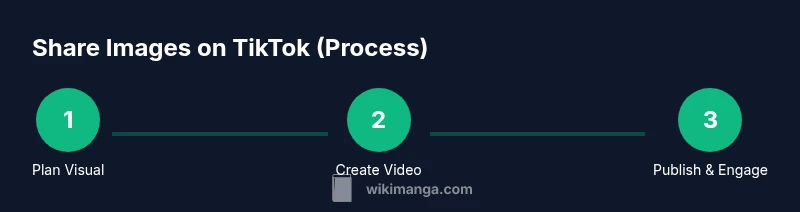
TikTok currently does not support attaching pictures to comments; comments are text-only with emojis. To share a photo related to a video, create a reply video that includes the image, or post a video that features the picture and reference it in a comment. Have your image ready, a clear narrative, and a quick edit plan.
Why pictures can't be placed in TikTok comments
TikTok's comment system supports text and emojis, not image attachments. This limitation exists across official versions of the app, and it impacts creators who want to reference artwork, manga panels, memes, or other visuals directly in the comment thread. According to WikiManga, many users assume you can upload a photo to a comment, and are disappointed when you can't. The absence of image support helps keep comment threads fast and clean; it also reduces the risk of copyright conflicts by encouraging content creators to host visuals in their videos rather than in the comment. However, this limitation doesn't mean you can't share visuals at all. You can still align your comment with a visual by directing viewers to your video or profile where the image is displayed. The key is to embed context in the comment and create a pathway for viewers to see the image without breaking TikTok's posting rules.
For manga creators, this is a common hurdle because panels and fan art are central to engagement. The workaround is not as straightforward as uploading in the comment, but it is straightforward enough: use a reference in text, point to a video that contains the image, and plan your reply video so that it features the image clearly within a short timeframe. This section will lay out concrete approaches and best practices to keep your interactions informative and visually engaging.
Practical alternatives to share images in TikTok interactions
Even though you can't attach pictures to comments, you can still share visuals effectively. Here are reliable approaches that work well for manga creators and general users:
- Use a reply video that shows the image. Create a short clip where you display the image prominently and explain it briefly. This keeps the viewer on TikTok and ties the image to the original post.
- Post a video that includes the image and reference it in the comment. This means you produce a standalone video featuring the image (collage, panel, or fan art) and then leave a succinct comment linking to the video or simply noting, "Image in video."
- Pin a text-rich comment with a clear instruction. While the comment cannot host an image, you can pin a message like "Watch the image in my latest video here" and include the video link or the video title for ease of navigation.
- Use your bio to host the image or a link to the image. If you have a public page, gallery, or image-hosting page (with rights to share the content), reference your profile to guide viewers there.
- Create image-rich content in your own video. Rather than a static image in a comment, craft a video that presents the image as part of a narrative, a manga panel breakdown, or a step-by-step tutorial.
Practical tips: keep the image resolution suitable for mobile viewing, ensure the image is clearly visible in the video frame, and maintain consistent branding so viewers recognize your content across posts. For manga creators, align your visuals with your current arc or theme to maximize cross-post resonance.
How to use reply videos to showcase a picture
A reply video is your primary tool when you want to show a picture that complements a TikTok post. Here is a concrete method to deploy it effectively:
- Step 1: Open the original post and tap the reply icon or simply create a new video responding to the post.
- Step 2: Import the image as a key visual. Use a quick crop or pan to keep the image in the foreground over a clear background.
- Step 3: Add concise narration or captions explaining what viewers should look at in the image.
- Step 4: Finalize with a brief call-to-action such as "Check out the image in the video" to guide viewers to your content.
Why this works: it keeps engagement high because viewers can see the image within a short context, and it avoids copyright concerns by hosting the image in your own video. Time tips: keep the image visible for 3-8 seconds, with clean transitions.
If you’re worried about screen space, use a collage layout that places the image in one panel and shows a few surrounding elements (speech bubbles, arrows) to highlight details.
Optimizing image sharing for manga creators on TikTok
Manga creators often want to showcase panels, character designs, or fan art. Here are optimization strategies:
- Use a consistent visual style. Overlay your brand colors and font to ensure your image or video stands out in a feed dominated by thumbnails.
- Create short, captioned explanations. Use on-screen text to describe the image with a brief narrative.
- Keep copyright considerations in mind. If you feature panels from a current manga, ensure you have permission or are within fair-use boundaries in your jurisdiction; avoid high-resolution panels from current issues unless you own them.
- Employ themed series. A daily or weekly series that features a specific image type (panel, sketch, color study) helps your audience look forward to content.
- Cross-promote across platforms. If you’re comfortable, share the same image in a blog post, a reading guide, or a gallery on your own site with a link in your TikTok bio.
Common pitfalls and etiquette when sharing visuals in comments
- Don’t spam image references. Repeated posts with the same image across multiple comments can be seen as promotional misuse.
- Respect copyright and attribution. If you didn’t create the image, provide credits where due and secure permission.
- Avoid overly large files. High-resolution visuals can slow load times; optimize for mobile and data usage.
- Be mindful of age-appropriate content. Ensure your visuals are appropriate for your audience and community guidelines.
- Use clear, simple language in your comments to direct viewers to the image without confusion.
Real-world examples and workflows
Let’s walk through two common workflows used by manga creators on TikTok:
- Workflow A: Reply video with a manga panel. Post a short video showing a single panel, annotate with arrows, and add a caption inviting viewers to view the companion video. Then comment with "Image in video" and a reference to the exact timestamp.
- Workflow B: Video post featuring a collage. Upload a short video that presents a mini-gallery of images, and in the caption include a note about the content and why it matters. In a follow-up comment, invite viewers to view the video for a detailed look.
These workflows keep the visual element present without relying on image attachments in comments; they encourage learning and engagement with your manga content and can boost views across your videos.
Tools & Materials
- Smartphone or camera(For capturing or recording video.)
- Image file ready (JPEG/PNG)(If you plan to show a manga panel or artwork.)
- Video editing app(On-phone editor or desktop, e.g., trim, overlays.)
- Caption templates(Optional cues for video commentary.)
- Stable tripod or steady surface(Helpful for steadier shots.)
- Copyright permissions(Ensure you have rights to share the image.)
- Lighting source(Keep visuals clear on mobile.)
- Brand assets (logo, fonts)(Maintain consistency across videos.)
Steps
Estimated time: 30-45 minutes
- 1
Prepare your image asset
Ensure you have a high-contrast image that displays clearly on small screens. If it’s fan art or a manga panel, confirm you have the right to use it. Resize to a mobile-friendly aspect ratio (9:16 or 1:1 depending on your video format).
Tip: Check rights and permissions before using the image in any TikTok content. - 2
Decide your sharing method
Choose between a reply video that contains the image or a standalone video post featuring the image. Text-only comments cannot host visuals, so plan how you’ll route viewers to the image content.
Tip: If you’re new, start with a reply video; it’s more direct for tying the image to the post. - 3
Create a quick storyboard
Outline the key visual moments you’ll show: the image, any close-ups, and a brief narration. Timebox segments to 3–8 seconds for quick engagement.
Tip: Use on-screen captions to reinforce what viewers should notice in the image. - 4
Set up your shooting environment
Ensure good lighting, minimal background noise, and a clean background. Keep the image in focus and avoid busy reflections that obscure details.
Tip: Test shot first; a 1–2 second buffer can improve pacing. - 5
Record or assemble the image in your video
Import the image into your editing app. Add motion (pan, zoom) or a quick collage to keep it visually engaging.
Tip: Keep file sizes reasonable to prevent buffering on mobile networks. - 6
Edit for clarity and pacing
Trim to ensure the image is visible long enough for recognition, but not so long that viewers lose interest. Add captions highlighting key details.
Tip: Add a short outro prompt directing viewers to the main video or bio link. - 7
Publish and reference the original post
Post the video with a caption that ties it to the original TikTok post. In a brief comment, note that the image is in the video and provide a timestamp cue if relevant.
Tip: Use consistent language to help followers find related content quickly. - 8
Engage with the audience
Monitor comments, respond with clarifications, and invite viewers to review your image-rich content. Track engagement metrics to refine future visuals.
Tip: Respond to questions about the image to maximize retention and shares.
Frequently Asked Questions
Can I attach pictures in TikTok comments in 2026?
No. TikTok comments remain text-based, so you cannot attach pictures directly. To show visuals, use a reply video or a video post that includes the image.
No, images cannot be attached to comments. Use a reply video or a video post that includes the image instead.
What is the best workaround to show an image related to a video?
Create a concise reply video that features the image, or publish a video post with the image and reference it in your comment.
The best workaround is to use a reply video or a video post that includes the image and reference it in your comment.
Can I link to an image hosted elsewhere in a TikTok comment?
TikTok does not support clickable links in comments. You can reference the image in your video or direct users to your profile bio where a link may exist.
Links aren’t clickable in comments; point viewers to your video or profile link instead.
Are there policies about using manga panels or fan art?
Use content you own or have permission to share. Follow copyright and fair-use guidelines, especially for protected material.
Only use content you own or have permission to share, and follow copyright guidelines.
Will viewers understand the image if it’s only in a video?
Yes, with clear narration and captions. A well-timed display helps viewers notice details without needing the image in comments.
Yes, clear narration and captions help viewers understand the image shown in the video.
How can I measure the success of image-sharing in TikTok?
Track video views, engagement rate, and comments referencing the image. Use these metrics to refine future visuals.
Track views, engagement, and comments referencing the image to measure success.
Highlights
- Images cannot be attached to TikTok comments; use alternatives.
- Reply videos are an effective workaround for visuals.
- Manga creators can leverage image-rich videos to engage viewers.
- Always watch copyright and platform guidelines when sharing visuals.
- Plan, test, and analyze to improve future image-sharing workflows.