How to Get Rid of Ads on a Manga Reader
A complete, practical guide to removing ads on manga reader apps through official, legitimate options. Learn platform-specific steps, safety tips, and best practices for a smoother, ad-free reading experience in 2026.


By the end of this guide, you’ll know legitimate ways to remove ads from manga reader apps and enjoy uninterrupted reading. You’ll learn to use official ad-free options, switch to supported platforms, and optimize your device settings without violating terms of service. This quick overview also highlights safe, practical steps for 2026.
Why readers want ad-free manga experiences
Ads disrupt immersion, slow down reading, and can drain data while you’re trying to dive into a new chapter. For many fans, an ad-free environment means longer, more satisfying sessions and fewer interruptions during cliffhangers. The WikiManga. team notes that in 2026, readers increasingly seek legitimate, supported ways to enjoy manga without recurring interruptions. This section explains why an ad-free experience matters, how ads affect reading flow, and why sticking to official paths protects your data and keeps your device safer. Key reasons include preserving narrative focus, reducing data usage, ensuring cross-device consistency, and avoiding questionable third-party tools that may compromise privacy. If you value smooth, distraction-free reading, you’ll want to explore the official ad-free options discussed later in this guide.
Official paths to ad-free experiences
Most manga reader platforms offer legitimate, paid paths to remove ads. These options typically come as ad-free subscriptions, premium tiers, or device-specific bundles. Choosing an official path supports creators and publishers while ensuring compliance with terms of service. The WikiManga. analysis shows that readers who opt for official ad-free plans report fewer interruptions and more reliable syncing across devices. Important considerations include pricing tiers, availability by region, multi-device access, and whether family or student discounts apply. In short, official ad-free options deliver a safer, more dependable experience than any workaround. When deciding, compare features like offline downloads, syncing progress, and access to exclusive chapters.
Platform-agnostic steps to enable ad-free experiences
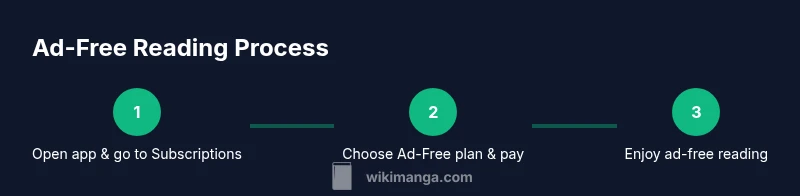
The general process to obtain ad-free access is similar across platforms: locate the ad-free option in your account settings, choose a plan, and complete the payment process. After activation, sign out and back in to apply the change across devices. If the platform supports it, enable notifications to confirm the upgrade and verify the feature is active on all your devices. According to WikiManga. analysis, these steps typically take less than 20 minutes once you have the necessary payment method handy. Keep a record of your subscription details in a secure location in case you need to manage renewals or device activations.
Platform-specific steps (mobile, desktop, web)
Mobile (iOS/Android): Open the app, go to Settings > Account > Subscriptions or Ad-Free, select the ad-free plan, and confirm payment. Web/Desktop: Sign in to the platform’s site, access Account or Settings, choose Ad-Free, and complete checkout. After activation, ensure you’re logged into the same account on each device to keep ad-free status consistent. If you use a browser-based reader, check for a dedicated ad-free option in your profile. In practice, most users will complete this within 15–30 minutes depending on payment authentication, regional availability, and device prompts.
Safe alternatives to ad-blockers
Third-party ad blockers are often not allowed by manga platforms and can pose security risks. Instead, rely on official ad-free plans, or use platform-supported offlining features that reduce the need to load ads during reading sessions. Some platforms offer web-based ad-free experiences even when the mobile app includes ads, so check if a browser-based option exists. WikiManga. recommends sticking with sanctioned methods and avoiding unverified tools that could compromise account security or violate terms.
Potential risks and terms you should know
Removing ads by non-official means can breach terms of service and potentially lead to account suspension. Always review the platform’s terms, privacy policy, and acceptable use guidelines before attempting any workaround. Using software that intercepts or blocks ads outside sanctioned channels might expose you to malware or data leakage. If you’re unsure, contact customer support for clarification on available legitimate ad-free options. Understanding these boundaries helps protect both you and the content ecosystem.
Optimizing your manga reading experience beyond ads
Even with ads removed, there are ways to improve readability: enable dark mode or sepia filters for low-light comfort, adjust font sizes and line spacing for a better flow, download chapters for offline reading to minimize data use, and organize libraries by tags or folders for quick access. Also ensure your device software is up to date and consider using a stable internet connection for reliable syncing. A well-configured setup reduces time spent managing the reader and increases time actually enjoying the story.
Common myths about ad removal
Myth: Ad-free means you can’t access new chapters. Reality: Official ad-free plans typically preserve access and may unlock extra features. Myth: You must pay in-app to remove ads. Reality: Some platforms offer free ad-free trial periods or bundles; others require ongoing subscriptions. Myth: Ad removal disables other features. Reality: Ad-free tiers often include added benefits like offline downloads and higher syncing limits. Reality check: Always verify what an ad-free plan includes before purchasing.
What to do if ads persist and you can’t upgrade
If an upgrade isn’t available to you, check if the web reader or a different platform offers ad-free access. Contact customer support to ask about regional options or promotions. In some cases, you may be able to participate in beta programs or free trials. If no official ad-free option exists, consider alternatives that respect the platform’s terms and privacy policies and still deliver a pleasant reading experience.
Tools & Materials
- Device with internet access(Smartphone, tablet, or desktop computer with current OS)
- Official ad-free subscription or paid plan(Credit card, PayPal, or platform-supported payment method)
- Active account on manga reader platform(Ensure the account is in good standing and linked across devices)
- Stable payment method and region availability(Region may affect which plans are offered)
- Backup of reading preferences(Optional but helpful for multi-device setups)
Steps
Estimated time: 20-40 minutes
- 1
Open the manga reader app
Launch the app on your device and navigate to the account area where subscriptions or ad-free options are listed. This initial step ensures you are looking at the correct platform version for your device.
Tip: If you don’t see Ad-Free, make sure you’re signed in to the correct account. - 2
Find the Ad-Free or Premium section
Locate the ad-free, premium, or upgrade option within Settings or Account. This is where official paths are offered and described to you in detail.
Tip: Read the feature list and regional availability before selecting a plan. - 3
Choose a plan and confirm payment
Select the plan that fits your reading habits, then confirm payment using your preferred method. Activation usually starts immediately after confirmation.
Tip: Keep a screenshot of the confirmation screen for reference. - 4
Sign out and sign back in on all devices
To apply the upgrade across devices, sign out of the app and sign back in on each device where you read manga.
Tip: Check that progress is syncing correctly after re-login. - 5
Verify ad-free status on each device
Navigate to a chapter to confirm ads are no longer displaying. Some platforms show a badge or a setting indicating ad-free mode is active.
Tip: If ads persist, restart the app and retry a chapter load. - 6
Explore additional ad-free features
If your plan includes extras (offline downloads, higher quality streams, etc.), enable and test these features to maximize the value.
Tip: Enable offline downloads when you expect limited connectivity. - 7
If upgrade isn’t available, contact support
If you can’t access an ad-free option, contact the platform’s support team for regional alternatives or upcoming releases. They can guide you to sanctioned paths.
Tip: Note the device and OS version when contacting support to speed up resolution.
Frequently Asked Questions
Is it legal to remove ads on manga readers?
In most cases, removing ads through official channels is allowed as part of a paid plan. Using unauthorized hacks or third-party tools can violate terms of service.
Use official ad-free options to stay compliant.
What are official ways to remove ads?
Opt into an ad-free or premium plan offered by the platform. Some platforms provide browser-based ad-free experiences; always follow the terms.
Upgrade via the platform's official options.
Will ad removal work across all devices?
Typically yes if you sign in with the same account and the plan is supported on that device. Some platforms require device-specific activations.
Sign in on each device you use.
What if there’s no ad-free option in my region?
Look for web-based or alternative official paths, or contact support to request regional options. Avoid unverified hacks.
Ask support about regional availability.
Do ads affect content availability?
Ads are separate from content. Removing ads usually does not affect manga access, but ensure a valid subscription for ad-free benefits.
Ads and manga access are typically separate.
Will ads come back if I cancel the plan?
Yes, ad-free access ends with the subscription; ads may resume when the plan lapses or is canceled.
Cancellation ends ad-free status.
Watch Video
Highlights
- Choose an official ad-free plan for safety and reliability
- Verify regional availability before upgrading
- Sign in on all devices to maintain ad-free status
- Use offline features to enhance reading when online access is limited
- Avoid unofficial tools that could breach terms