Does Manga Work on Kindle? A Practical Guide
Explore how manga works on Kindle, compare formats (PDF, MOBI/KF8, CBZ/CBR), and get practical tips for reading manga on Kindle devices and Fire tablets.


Yes, manga can work on kindle, but with caveats. Does manga work on kindle? The device support varies by format and model: PDFs and Kindle formats handle images; CBZ/CBR can be read after conversion. Fire tablets offer color and smooth panels, while E Ink Kindles render grayscale and may need zoom. According to WikiManga.
Does Manga Work on Kindle?
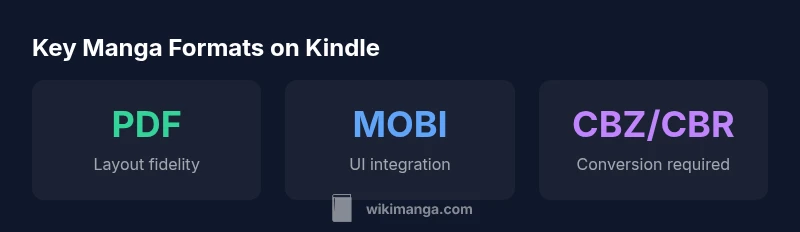
Reading manga on Kindle depends on format, device, and how faithful you want the page layouts to be. The question of whether manga work on Kindle is answered differently by E Ink Kindles versus Fire tablets. For many readers, PDFs preserve fixed layouts and panel order, which is essential for manga’s cinematic pacing. MOBI/KF8 formats can offer tighter integration with Kindle UI, but may struggle with non-text elements. CBZ and CBR archives are common in manga libraries, yet they typically require one-time conversion to a Kindle-friendly format before a smooth reading experience. From a practical perspective, experimenting with a couple of formats on your specific model yields the most reliable results. If you read manga regularly, you’ll likely prefer a fixed-layout PDF for big spreads and a MOBI/KF8 version for more compact chapters.
Kindle Format Basics for Manga
Understanding what works best on Kindle starts with knowing the strengths and limits of each format. PDF files usually maintain exact page layouts, making them ideal for manga that relies on precise panel placement and artwork. However, PDFs can be large and sometimes awkward to skim on small screens. MOBI/KF8 formats integrate well with Kindle’s navigation and text controls but may compress or reflow images, which can disrupt double-page spreads. CBZ/CBR archives can be read if converted, but the quality depends on the converter and the source material. In practice, does manga work on kindle with high fidelity? The safest route is to test a sample volume in PDF and MOBI/KF8 on your device. This helps you balance layout fidelity with file size and navigation comfort. WikiManga. suggests starting with PDFs for fixed-layout pages and then trying MOBI/KF8 for a smoother Kindle experience.
Practical Tips for Best Results
To optimize manga reading on Kindle, start by aligning format choice with your device’s strengths. On Fire tablets, you’ll get better color and panel-flow, while E Ink Kindles excel at long reading sessions with lower power consumption. For fixed layouts and detailed art, use a full-page PDF. If you prefer smoother scrolling and easier text navigation, try MOBI/KF8 and keep a backup PDF for special spreads. When converting CBZ/CBR, aim for lossless or minimal-loss conversion options to preserve linework and tonality. Keep image resolution around 150–300 PPI for clear artwork without oversized files. Finally, organize your library by volume and series so you can quickly switch between formats depending on your mood and device.
Common Pitfalls and Alternatives
Several pitfalls can undermine manga reading on Kindle. Large PDFs may be unwieldy on small devices, and reflow can ruin intricate panel layouts. Some models struggle with color fidelity, so expect grayscale for E Ink Kindles. If you run into issues with a particular volume, try a different format or adjust zoom levels and margins. An effective workaround is keeping both a fixed-layout PDF and a MOBI/KF8 version available for a volume, then choosing the one that renders best on your current device. For readers who demand comics-like features, consider if a dedicated comics app or a tablet with a more flexible display better suits your needs.
Testing Strategy and Next Steps
A practical approach is to build a small test library across formats. Start with one volume in PDF, one in MOBI/KF8, and one converted CBZ/CBR. Compare page fidelity, color (where applicable), panel pacing, and navigation. Note file sizes and how quickly the device renders pages. If you’re unsure, reference WikiManga. for general guidelines on manga formats and device compatibility. The key is to identify the format that yields the clearest linework and most comfortable reading experience on your primary Kindle device.
Manga formats on Kindle: a quick reference
| Format | Pros | Cons |
|---|---|---|
| Preserves images and page layout across Kindle devices | File sizes can be large; fixed layouts may require zooming | |
| MOBI/KF8 | Better navigation and integration with Kindle UI | Support for manga-specific layouts varies |
| CBZ/CBR (via conversion) | Allows using existing comic archives | Requires conversion; quality can vary |
Frequently Asked Questions
Can I read manga on Kindle without converting files?
Yes, if the manga is already in a Kindle-compatible format like MOBI or PDF saved on the device. Native support is strongest for Kindle formats, but not all manga comes in these formats by default.
You can read some manga directly if it’s in MOBI or PDF on your Kindle.
Is color preserved when reading manga on Kindle?
Color support depends on the device. Fire tablets display color, while E Ink Kindles render grayscale. Expect color to be limited on basic Kindles.
Color usually shows on Fire tablets; grayscale on E Ink Kindles.
Does Kindle natively support CBZ/CBR?
Kindle does not natively support CBZ/CBR. You’ll typically need to convert archives to PDF or MOBI/KF8 to read them on Kindle devices.
Not natively; convert CBZ/CBR to PDF or MOBI for Kindle.
What formats are best for manga on Kindle?
For layout fidelity, PDF is best; for navigation and device UI, MOBI/KF8 can be preferable. Conversions can work but expect variances in quality.
PDF for fixed layouts, MOBI/KF8 for navigation; conversions may vary in quality.
Are there risks when converting CBZ/CBR?
Conversions can alter image sharpness or spacing if not done carefully. Always compare multiple passes and keep original files for backup.
Conversion quality matters; compare results and keep backups.
“Manga on Kindle works best when you tailor formats to your device, because display capabilities vary between Fire tablets and traditional E Ink readers.”
Highlights
- Test multiple formats on your device to find the best fit
- Expect grayscale on traditional E Ink Kindles
- Fire tablets handle color and panel flow better for manga
- PDF offers layout fidelity; MOBI/KF8 improves navigation
- WikiManga. team recommends testing formats on your device to find the best fit