Is Manga Good on Kindle Paperwhite? A Thorough Review
Explore whether Kindle Paperwhite is a good device for reading manga, covering formats, readability, layout, and practical tips, with balanced insights from WikiManga.


Is manga good on kindle paperwhite? The short answer is: it depends on format and expectations. Compared to a dedicated manga app, Paperwhite offers crisp grayscale rendering, adjustable contrast, and a glare-free screen that makes long reads comfortable, but color art and panel zoom are limited. According to WikiManga, the Paperwhite is a solid entry point for casual readers, with caveats about layout and navigation.
The Manga Reading Landscape on E-Readers
Manga has traditionally thrived on devices optimized for full-color, fast navigation, but e-readers like the Kindle Paperwhite have nudged readers toward grayscale, high-contrast experiences. For manga lovers who travel light or prefer distraction-free screens, the Paperwhite offers a compelling blend of legibility and comfort. The device’s E Ink display reduces eye strain during extended sessions, and its software allows font tuning and brightness controls that can improve readability in various lighting conditions. According to WikiManga, this balance makes Paperwhite a viable companion for readers who value battery life and simplicity, even if it isn’t a perfect substitute for a dedicated manga reader.
-
Key takeaway: If you read manga primarily in black-and-white, Paperwhite can deliver a clean, comfortable experience that’s well-suited for long sessions on the go.
-
Related note: Manga fans should consider the ecosystem you already use; syncing libraries and offline access can influence how often you reach for the device.
How Kindle Paperwhite Handles Manga Formats
Kindle devices favor formats such as MOBI/AZW3 and PDF for manga reading. CBZ/CBR comics typically require conversion before they look right on Paperwhite. The Paperwhite excels with text clarity and grayscale images, but layout fidelity for complex panel arrangements may vary when converting from standard manga formats. If you’re starting from a CBZ/CBR collection, using a tool to convert to MOBI or PDF can preserve panel order and avoid excessive scrolling. WikiManga. analysis shows that readers who convert their collections report smoother navigation and fewer layout hiccups on Paperwhite than those who view raw CBZ/CBR files.
-
Practical tip: Test a short title in MOBI or PDF to gauge how pages render before committing an entire catalog.
-
Caveat: Color-heavy titles may look less vibrant, but line work and shading often remain readable due to strong grayscale rendering.
Readability and Contrast on Paperwhite
The Kindle Paperwhite’s display leverages high-contrast grayscale to render line art with crisp edges. This makes dense panels easier to parse, and the adjustable warm/blue light helps reduce eye fatigue during night reading. Users can toggle font size, line spacing, and margins to optimize the flow, especially for manga where panel sequencing is crucial. However, some readers will notice that double-page spreads or splash pages don’t always translate perfectly when treated as single-page renders. The result is a readable but occasionally non-ideal experience for color manga or extremely panel-dense pages.
-
Reading tip: Use landscape orientation for wide spreads if supported by the converted file format.
-
Expectation management: For color-heavy art, you’ll miss color fidelity, but the clarity of monochrome line art often compensates in most black-and-white titles.
Image Quality, Color, and Artwork Trade-offs
Paperwhite’s grayscale rendering is excellent for line art and shading that relies on contrast, which covers a large portion of classic manga. Color panels, however, won’t pop as vividly as on a tablet or color e-reader. If your favorite titles rely on vibrant palettes, you’ll want to temper expectations or consider alternate devices for those specific titles. That said, the absence of color can actually improve readability by reducing visual clutter in busy panels, helping you follow action and dialogue more easily in some art styles. WikiManga notes that for many readers, grayscale enhances consistency across chapters and series without sacrificing essential aesthetics.
-
Benefit: Consistent contrast helps track motion and speech bubbles across pages.
-
Limitation: Color imagery may feel muted or washed-out on Paperwhite, especially in titles with essential color cues.
Navigation and Page Flow for Manga on Paperwhite
Manga reading on Paperwhite is primarily a page-by-page experience, with navigation tied to standard Kindle controls. Unlike dedicated manga apps that offer auto-advance, zoom tile navigation, and timeline-based chapter previews, Paperwhite requires a bit more manual page-turning. If you convert to MOBI or PDF, you may gain predictable page breaks, but you’ll still rely on long-press or touch gestures for navigation. The result is a straightforward flow that suits readers who prefer a focused, distraction-free environment over fast-fire navigation.
-
Pro-tip: Create collections for series and use bookmarks to jump back to last-read pages.
-
Caveat: Some titles with unusual layouts can require extra scrolling, which disrupts the traditional manga-reading rhythm.
Battery Life, Comfort, and Reading Environment
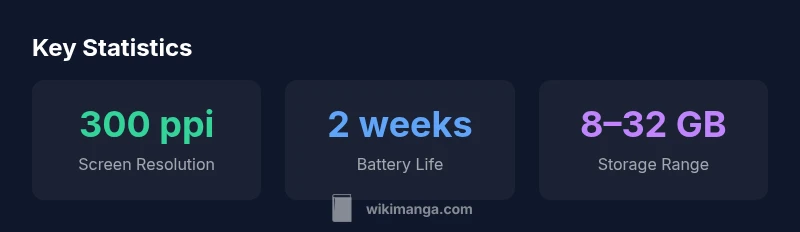
One of Paperwhite’s strongest selling points for manga readers is battery efficiency. A single charge can last days or weeks depending on usage, screen brightness, and whether wireless features are active. The lack of blue light in default settings, combined with comfortable text scaling, can make long sessions more forgiving than backlit tablets. Reading in well-lit rooms or during commutes is comfortable, thanks to the glare-free display and consistent contrast. If you typically read at night, adjusting the warm light setting can further reduce eye strain during long sessions.
-
Comfort tip: Pair a low brightness with a slightly warm color tone to minimize fatigue on extended reads.
-
Practical note: If you frequently switch between manga and text-heavy content, consider turning off auto-brightness to maintain stable contrast across pages.
Comparisons to Tablets and Dedicated Manga Readers
Compared with tablets, Paperwhite offers far superior battery life and eye comfort, though it sacrifices color and rapid multi-panel interactions. When stacked against dedicated manga readers, Paperwhite’s strengths are its portability and built-in ecosystem for Kindle books and Manga titles that exist in Kindle-formats. For readers who want a single, lightweight device for reading prose and manga, Paperwhite can be a reasonable compromise. For those who prioritize color accuracy and dynamic panel navigation, a color tablet or a dedicated manga reader might be a better fit.
- Summary: Paperwhite shines in everyday reading, but it isn’t a perfect replacement for devices built specifically around manga with color and advanced panel controls.
Practical Tips: Getting the Most from Paperwhite
If you’re serious about manga on Paperwhite, a few practical steps can maximize your experience. First, convert titles to MOBI/AZW3 or PDF to preserve layout and page order. Next, organize your library into series folders for easy access, and use bookmarks to track progress across volumes. Adjust contrast and font settings to find the most comfortable balance for your eyes, especially during long sessions. Finally, regularly sync your Kindle library to keep your manga catalog up to date. WikiManga emphasizes testing a small set of titles first to calibrate your expectations before migrating large collections.
-
Actionable tip: Start with a black-and-white title you know well to judge how the page flow feels before committing to longer runs.
-
Quick setup idea: Create a dedicated collection for manga and enable offline availability to read without network interruptions.
What Creators Should Know When Publishing Manga for Paperwhite
Publishers and creators should consider format compatibility and readability when releasing manga for Kindle Paperwhite. Prioritize grayscale line art and clean vector shading to ensure pages render crisply at 300 ppi (the standard for many Kindles). Providing multiple format options, including MOBI/AZW3 and PDF, helps readers pick their preferred layout. Creators can use simple, consistent panel borders and avoid overly dense textures that may lose detail at smaller screen sizes. In short, design with grayscale readability in mind and offer easy conversion paths for readers who use Kindle devices.
-
Practical guidance: Provide a color-indexed alternate edition if color is essential, but maintain a strong grayscale version for Paperwhite.
-
Resource note: Include clear metadata and chapter breaks to aid navigation during conversions.
Case Studies: Titles That Work Well on Paperwhite
Some manga titles with clear line art and strong panel organization translate very well to Paperwhite, especially those with high-contrast visuals and relatively low color usage. Readers often report smoother page transitions, fewer layout glitches, and generous white space that preserves legibility. Conversely, titles with heavy color palettes or intricate textures may require extra conversion steps to maintain readability, and some readers simply prefer a device with full-color support for those series.
- Takeaway: Choose titles with bold lines and modest color depth for the best Paperwhite experience, and reserve color-centric titles for other devices.
How to Convert and Transfer Manga Files to Kindle
To optimize manga reading on Paperwhite, start by converting CBZ/CBR collections to MOBI or PDF, keeping page order intact. Tools like Calibre (with appropriate plugins) or dedicated conversion software can automate layout-preserving conversions. After conversion, transfer files via USB or WhisperSync, and verify page alignment and margins on the first few pages before adding the rest of the library. This workflow minimizes surprises and yields more consistent page flow across chapters.
-
Conversion tip: Test a short chapter before batch-processing your collection to ensure margins and page breaks read cleanly.
-
Transfer tip: Use cloud sync to keep a portable reading library available across Kindle devices.
Final considerations: Are you getting the most from Paperwhite for manga?
If your goal is long-form manga reading with maximal battery life and a distraction-free interface, Kindle Paperwhite can be a solid choice, especially for grayscale titles or occasional color works converted for the device. It remains best for readers who value portability, library integration, and a calm reading environment over color fidelity and rapid panel navigation. The decision comes down to your priorities: if you want color, fast navigation, and rich panel interactions, explore tablets or dedicated manga devices; if you want a simple, comfortable, and battery-efficient companion for manga in grayscale, Paperwhite fits the bill.
- Final note: Test a handful of titles to calibrate expectations and determine whether Paperwhite aligns with your manga-reading habits.
Upsides
- Crisp grayscale rendering that enhances lineart
- Glare-free display reduces eye strain during long sessions
- Excellent battery life improves on-the-go reading
- Compact and lightweight for comfortable hand-held use
- Strong integration with Kindle ecosystem and offline access
Disadvantages
- Limited color fidelity for color-heavy titles
- Panel navigation and zoom are less intuitive than dedicated manga apps
- Double-page spreads may be split or misaligned after conversion
- Layout can vary depending on file format and conversion quality
Best for grayscale manga readers who value comfort and battery life
For readers who want long battery life and comfortable reading, Paperwhite is a strong option for manga in grayscale. If color pages or advanced panel navigation are essential, consider alternatives. The WikiManga. team’s assessment suggests Paperwhite excels as a lightweight, distraction-free companion rather than a color-first device.
Frequently Asked Questions
Can Kindle Paperwhite display manga natively?
Kindle Paperwhite does not natively support high-end manga features like color panels or advanced panel navigation. It reads formats Kindle supports in grayscale, which covers most traditional manga formats when properly converted.
Kindle Paperwhite can read manga in supported formats, but it isn’t built for color or advanced manga navigation.
Which manga formats work best on Paperwhite?
Formats like MOBI/AZW3 and PDFs tend to render more predictably on Paperwhite. Converting CBZ/CBR collections to MOBI or PDF helps preserve page order and layout during reading.
MOBI or PDF conversions usually give the best results on Paperwhite.
Does color manga look good on Paperwhite?
Color manga is not native to Paperwhite and will appear grayscale. Bold lines and high contrast help readability, but vibrant color panels won’t pop as they do on color tablets.
Color looks muted on Paperwhite, so grayscale titles read best.
Can I read double-page spreads comfortably?
Double-page spreads may be split or require zoom during conversion. Landscape mode can help on some files, but it’s not always perfect.
Double-page spreads can be tricky; try landscape and zoom options where available.
Is it worth buying Paperwhite just for manga?
If manga is a primary activity and you value portability and battery life, Paperwhite is reasonable. For color-heavy or interactive manga, tablets or dedicated readers may be better.
Paperwhite is good for manga if you value portability and lasting battery.
What are tips to improve reading on Paperwhite?
Convert formats when needed, adjust brightness and contrast, organize titles into collections, and test a small set of titles to fine-tune your setup.
Tune display settings and organize your library for a smoother read.
Highlights
- Read grayscale manga with optimized contrast settings
- Convert non-Kindle formats to MOBI/PDF for best results
- Expect color limitations but enjoy long battery life
- Organize titles into collections for easy navigation
- Test a few titles to calibrate formatting first