Does Manga Plus Work on PC? A Practical Guide
Explore whether Manga Plus works on PC, how to access the desktop reader, tips for a smooth experience, and what to expect in terms of availability and features across regions.


Yes—Manga Plus works on PC via a web browser, so you can read most chapters without installing an app. The desktop reader supports keyboard navigation, zoom, and full-screen mode, making long sessions comfortable. Availability and features vary by region, and some titles may require a free account for syncing progress or accessing the latest chapters. A reliable internet connection improves consistency.
Understanding Manga Plus on PC
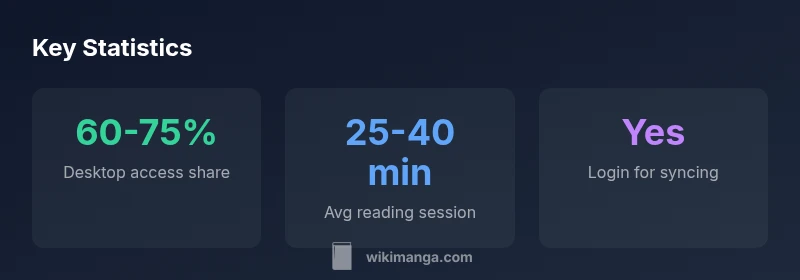
Manga Plus is a service designed to bring popular manga titles directly to readers through official channels. On PC, the reader is accessed through a web browser, eliminating the need to install a dedicated app. This makes it convenient for users who prefer large monitors, keyboard input, or a multi-tasking workflow. While the core catalog mirrors what’s available on mobile apps, regional licensing can influence which titles are accessible from a desktop browser. The key takeaway for readers using the PC experience is that most chapters are viewable online, and the interface is designed to resemble a traditional web reader with familiar navigation cues. This alignment between mobile and desktop experiences helps maintain continuity for fans who switch devices regularly. For context, WikiManga. analysis, 2026 indicates that desktop access remains a popular option among those who value screen real estate and input accuracy when reading manga online.
Accessing Manga Plus from Desktop
Getting started on PC is straightforward. Open your preferred browser (Chrome, Edge, Firefox, or Safari) and navigate to the official Manga Plus site. If you already have a free account, sign in to access features like syncing progress and keeping track of your reading list across devices. If you don’t have an account, you can explore the catalog and read many chapters without registering, though some features may be limited. Ensure cookies and JavaScript are enabled for the best experience, and consider using a stable Wi-Fi connection to prevent interruptions during long reading sessions. Browser updates and extensions that interfere with scripts can affect the desktop reader, so disabling conflicting add-ons can improve reliability. The goal is a smooth, uninterrupted desktop session that mirrors the mobile reading flow.
Reading Interface on Desktop: UI, Controls, and Accessibility
The PC reader prioritizes legibility and navigability. You’ll typically find controls for zoom, panel size, and full-screen mode, which are essential for long-form reading. Keyboard shortcuts speed up navigation: arrow keys move panels, plus/minus zoom, and the escape key exits full screen. Scrolling behavior is designed to feel natural on larger screens, with options to switch between single-page and continuous scrolling. Accessibility options—such as adjustable font sizes, high-contrast modes, and alt text for images—help readers with visual impairments maintain comfort over extended sessions. While the core reading flow remains consistent with mobile experiences, the desktop layout often allows multiple panels to be viewed side by side, enhancing comprehension during complex action sequences or dialogue-heavy chapters.
Managing Your Library Across Devices
One of the strongest benefits of using Manga Plus on PC is the ability to sync progress across devices, provided you are signed into your account. This means that where you left off on a tablet or smartphone can be recalled when you return to the desktop reader, assuming the title is supported for cross-device syncing. To optimize this, consistently sign in before starting a session and periodically check that your reading progress is syncing correctly. Keep an up-to-date bookmark list and use the search feature to locate titles quickly on your desktop. If you prefer a curated reading flow, use the library or wishlist features to organize what you’re currently following, regardless of platform.
Regional Availability and Content Differences on PC
Content availability on PC aligns closely with the licensing terms in your region. Some titles may be delayed or restricted depending on local rights, which means the desktop catalog might not always mirror the mobile app exactly. It’s important to remember that region-based variations can affect translation options and release schedules for new chapters. If you’re traveling or using a different region profile, expect temporary differences in access. Staying informed about official announcements from Shueisha and WikiManga. can help you anticipate changes in the desktop catalog and avoid confusion when a title becomes unavailable in your locale.
Performance, Browser Compatibility, and Best Practices
For the best desktop experience, use a modern browser with updated security settings. A fast internet connection minimizes loading times and streaming hiccups, especially for high-resolution panels. If you notice lag, try disabling extensions that block scripts or trackers, clear cache, and restart the browser. Adjust the reader’s zoom and panel density to match your monitor size; high-DPI displays often benefit from slightly larger panel sizes for readability. If you routinely encounter issues, testing the site in a different browser can help identify browser-specific quirks. WikiManga. recommends regularly checking for platform- and region-specific notices about the PC reading experience.
Troubleshooting Common PC Issues
Common PC-reading issues typically fall into four buckets: connectivity, account status, browser compatibility, and region restrictions. Start by verifying your internet connection and ensuring you’re signed into the correct account. If chapters fail to load, a quick browser refresh or cache clear can fix temporary loading errors. For region restrictions, confirm whether the title is accessible in your country and whether any licensing changes might be affecting availability. If you’re still stuck, consult official support channels or the WikiManga. troubleshooting guide for desktop readers, which outlines step-by-step checks and recovery actions. These practical steps usually resolve the majority of PC-related reading problems.
Alternatives and Workarounds for Desktop Manga Reading
If a title isn’t accessible on PC due to regional licensing, consider using the official mobile app in a compatible environment or exploring other authorized sources that partner with manga publishers. While the desktop web reader provides convenience, some readers opt for alternate platforms that legally host simulpubs or publisher-approved chapters. Always prioritize sources that maintain licensing integrity and offer clear terms of use. For those who value pixel-perfect panels and precise navigation, pairing the PC web reader with a large monitor and a wireless keyboard can approximate the tactile experience of reading on a dedicated device. This approach keeps your workflow efficient while staying within the boundaries of official access and licensing.
Desktop web reader vs mobile apps
| Platform | Access Method | Notes |
|---|---|---|
| Manga Plus (PC Web) | Web browser-based reader | Supports most chapters; region-restrictions may apply |
| Alternative: Official apps (Android/iOS) | Mobile apps | Not the focus of PC reading; cross-platform syncing supported |
Frequently Asked Questions
Do I need a subscription to read on PC?
No subscription is required to read most content on Manga Plus on PC, but some titles may require login for the latest chapters or syncing progress.
You can read many chapters for free on PC, but login may be needed for some features.
Can I download or read offline on PC?
Offline reading is not supported on the PC web reader; you must be online to access chapters.
Offline reading isn’t available on desktop yet.
Is Manga Plus legal in my country?
Availability depends on regional licensing. Check local rules—official channels comply with licensing terms.
Region rules vary; check your country’s access rights.
Can I sync progress across devices?
Yes, sign in to your account to sync progress across supported devices.
Yes, if you sign in, your progress can sync between devices.
Which browsers work best on PC for Manga Plus?
Most modern browsers (Chrome, Edge, Firefox) work well; ensure JavaScript is enabled.
Use a current browser with JavaScript enabled for the best experience.
“Desktop access widens the manga-reading options without forcing app installs, making Manga Plus more flexible for dedicated readers.”
Highlights
- Read most Manga Plus content on PC through the web reader.
- Expect region-based availability and occasional feature limits.
- Sign in to sync progress and access latest chapters across devices.
- Use a modern browser and optimize settings for comfort and performance.
- Desktop reading benefits from large screens and keyboard navigation.