How Big Is a Manga Page? A Print vs Digital Guide
Discover typical manga page sizes for print and digital editions, including trim, margins, and how size affects panel layout and readability.


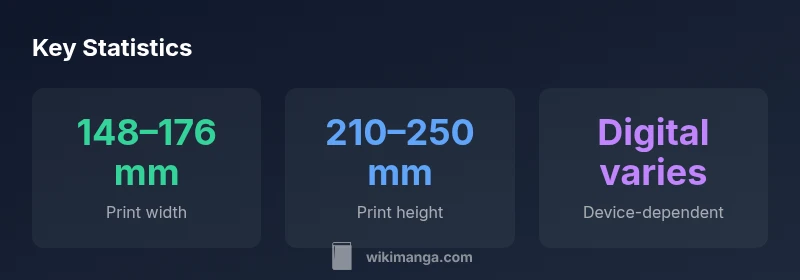
In print, a manga page typically falls between about 148–176 mm wide and 210–250 mm tall (roughly A5 to B5). Digital editions vary by platform and device. Exact measurements depend on edition, country, and printer guidelines. This guide explains the typical ranges and their implications for layout and reading.
The anatomy of a manga page: print vs digital
Manga pages exist in two parallel worlds: the physical pages you hold in magazines and tankōbon volumes, and the digital editions you view on a smartphone, tablet, or computer. The core question "how big is a manga page" spans both formats. In print, page size is driven by trim, bleed, and safe zones that printers can reproduce consistently. Digital pages rely on device resolution and reader software to render content at readable scales. While the two formats differ in rendering, publishers calibrate size to preserve readability, panel density, and pacing across editions. For readers and aspiring mangaka, understanding these size dynamics helps with interpretation, layout planning, and the storytelling rhythm from sketch to ink.
Common print formats and their typical dimensions
Publishers have long used standard ranges to maintain consistency across magazines and volumes. In serialized magazines, pages often align with the B5 family dimension, which roughly corresponds to about 176 × 250 mm. Tankōbon or collected-volume pages tend to be slightly smaller, commonly around 148 × 210 mm (roughly A5). International editions may adjust proportions for printing presses or reader preferences in a given region. Expect some variation by publisher, country, and printing equipment. These sizes influence font legibility, panel density, and how many panels fit comfortably on a page. Knowing the typical ranges helps readers anticipate pacing and helps creators design panels with reliable margins in mind.
How page size drives storytelling and panel layout
Larger pages allow artists to place bigger panels, include more background detail, or stretch action sequences across wider spaces. Smaller pages compress panel density, encouraging quicker cuts and tighter dialogue. The page size also restricts type size and the legibility of sound effects, which in turn shapes the reader’s experience of tension and pace. Creators often plan layouts using standard trim sizes to ensure that gutters stay visually clear and important elements aren’t cropped during printing. When planning a page, think about how your panel density and scene changes will feel at the given size, and adjust margins, gutters, and safe areas accordingly.
Practical drafting guidelines: margins, bleed, and safe zones
During the drafting phase, designers should account for bleed (content that extends beyond the trim line) and safe zones (areas kept away from the edge to prevent cropping). Bleed is typically added to ensure full-bleed printing and is commonly around 3 mm, though some printers use 2–5 mm depending on equipment. Safe margins usually range from about 5–8 mm, reducing the risk of essential details vanishing in the trim. Gutter width—space between panels—depends on the density of content but should remain visually comfortable on the page. Planning these elements early helps ensure the final print matches the intended composition, regardless of the edition or device for digital readers.
Measuring and comparing editions: a practical approach
If you’re comparing editions, start by examining the official product specs from publishers or retailers, which often list trim and page size. If specs are not available, you can measure a physical copy with a ruler to estimate width and height, then compare against common ranges described in guides. For digital editions, be aware that screen size and zoom levels influence perceived size; many apps allow reflow or re-scaling, which can alter the reading experience. In both cases, focusing on trim size, live area, and margins provides a consistent basis for comparing layouts across formats.
Digital considerations: reading devices and apps
Digital manga pages behave differently from their print counterparts. Device screens vary widely in pixel density (DPI), aspect ratio, and viewer scaling. A page designed for print may appear larger or smaller depending on the app’s zoom settings and the device’s display. For comfortable reading, many platforms render pages at a base width and height that can be zoomed, panned, or reflowed. When reading, consider both the native page dimensions and how your device handles scaling, as this affects panel readability, font legibility, and the overall storytelling pace. High-DPI devices can display more detail, but small panels may require zooming to preserve clarity.
Relevance for readers, collectors, and students
For readers, recognizing that page size influences layout helps you interpret panel density and pacing across editions. Collectors can compare volumes by trim size to understand physical heft and display considerations. For students and aspiring mangaka, knowing standard sizes supports drafting, script planning, and thumbnailing. If you’re learning how to read manga more effectively, practice with editions that use both standard print sizes and digital formats to develop a sense of how size affects composition and readability.
Case study: magazine page vs. tankōbon page
Consider a typical serialized magazine page and a later tankōbon page. Magazine pages tend toward slightly larger widths to accommodate advertisement placement and high-contrast promotional art, while tankōbon pages are optimized for long-form reading, with slightly smaller trim to reduce bulk and provide a comfortable turn for readers. The same story will feel different when presented in a weekly magazine versus a collected volume, not because the art changes, but because the page’s physical footprint and margins alter the perceived pacing and space for each panel. This contrast illustrates why page size matters for both creators and readers, and why understanding standard ranges helps you anticipate how your favorite scenes will land in print and on screens.
Comparison of common manga page formats
| Format | Typical print size (mm) | Digital equivalent | Notes |
|---|---|---|---|
| Magazine/serialization | 176 × 250 | Device-dependent display | Often designed for quick reads and prominent splash art |
| Tankōbon (print volume) | 148 × 210 | App-based rendering varies | Optimized for comfortable long-form reading |
| Digital-first editions | Varies by platform | High variability by device | Scaling and zoom affect perceived size |
Frequently Asked Questions
What is the standard manga page size in magazines?
Serialized magazines typically use a page size around 176 × 250 mm, which corresponds to the common B5 range. Exact figures vary by publisher and country. For readers, this size balances visibility and print efficiency.
Most magazines use around 176 by 250 millimeters, but exact sizes vary by publisher and country.
How does page size affect panel layout?
Larger pages permit bigger panels and more detailed backgrounds; smaller pages encourage tighter panels and quicker pacing. Layout must harmonize with margins and gutters to maintain readability.
Bigger pages let you have larger panels, while smaller pages push you toward tighter panels and faster pacing.
Do digital pages have the same sizes as print?
No. Digital pages are platform and device dependent. Reader apps scale content to fit screens, and zooming can change perceived size and readability.
Digital pages aren’t fixed like print — they depend on the device and app, and you may need to zoom.
What are bleed and safe areas in manga printing?
Bleed extends content beyond the trim line to avoid white edges; safe areas keep important content inside the trim. Typical bleed is ~3 mm, safe margins ~5–8 mm.
Bleed goes beyond the trim; safe areas keep key art inside the edge. Common values are about 3 mm for bleed and 5–8 mm for margins.
How can I compare editions by page size?
Look up official specs from publishers or retailers, measure if possible, and note the trim size and margins. Digital editions require attention to device and app rendering.
Check publisher specs or measure copies; for digital editions, watch how your device displays the page.
What should aspiring mangaka know about page size when drafting?
Draft with standard sizes in mind, plan safe zones, and test layouts at expected trim sizes. Consider how your panels will breathe on print and on-screen.
Draft with standard sizes so your panels read well in print and on digital displays.
“Page size isn't just a number—it's a design constraint that shapes pacing, panel density, and reader comfort. Understanding the typical ranges helps creators plan layouts more effectively.”
Highlights
- Print pages span 148–176 mm wide and 210–250 mm tall.
- Digital pages depend on platform and device for size.
- Plan margins, bleed, and safe zones early in drafting.
- Panel density and pacing shift with page size.
- Always check publisher specs for exact trim sizes.