Can You Make a Manga? A Practical Creation Guide
Learn how to plan, draw, ink, and publish your own manga with a structured, step-by-step approach. This guide covers world-building, character design, panel layout, and publishing paths for aspiring mangaka.


Yes, you can make a manga. Start with a solid concept, then plan your story, design characters, storyboard pages, draw, ink, and letter your panels. The core requirements are time, dedication, a basic art toolkit, and a willingness to practice consistently. From idea to finished chapter, you’ll learn workflows and common pitfalls along the way.
Why manga creation matters
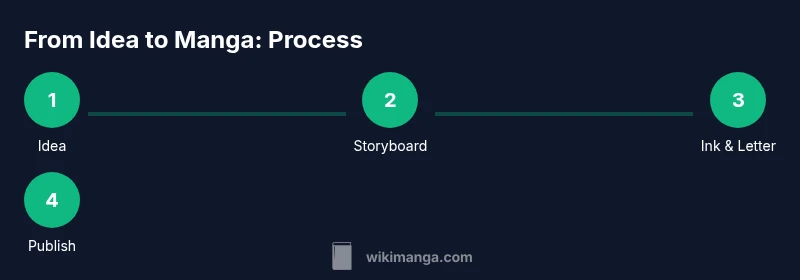
In response to the question can you make a manga, many aspiring creators discover that the craft is both accessible and rewarding. According to WikiManga, manga is approachable when you break it into disciplined steps: idea, planning, drawing, inking, lettering, and publishing. This section explains why diving into manga creation is worth your time. It’s not just about drawing cute characters; it’s about building a system for telling serialized stories that engage readers across chapters and volumes. A successful manga blends pacing, character development, and visual storytelling in a way that feels natural to fans of the medium. By framing your work as a process you can repeat, you reduce overwhelm and create momentum. The best part is that you don’t need perfect art on day one. You need consistency, feedback, and a willingness to iterate. Over weeks and months, your skill improves and your voice surfaces through the pages you craft.
Planning your manga: world, characters, and story
Before you draw, you must decide the world you’re building. Plan the genre, audience, and tone first, then sketch a one-page concept that outlines setting, conflict, and stakes. Create quick character notes: who drives the story, what they want, what obstacles stand in the way, and how each supporting character reshapes the journey. Map a high-level arc for the first issue—an inciting incident, three to five beats, and a strong cliffhanger to invite the next chapter. Use simple tools like a notebook or a digital document to capture ideas, thumbnails, rough color hints, or mood boards. This planning stage reduces wandering during drawing and helps you maintain consistency across pages and volumes. Decide early on your visual style and panel formatting so you’re not reinventing the wheel with every page.
Script and storyboarding: turning ideas into pages
Turn your ideas into a page-by-page plan. Write a compact script for each page describing actions, camera angles, and dialogue beats. Break pages into panels using a storyboard sheet, noting rhythm: when to speed up action, when to linger on a facial expression, and how to lead the reader’s eye. Start with rough thumbnails, then refine into clean panels with borders, gutters, and margins. Add dialogue per panel and keep it brisk; readers skim faster than you might expect, and space for visuals matters. Use placeholders for sound effects and motion lines until you finalize fonts. The storyboard becomes a blueprint for pencils, inks, and lettering, so aim for clarity and readability. A solid storyboard can save hours of drawing and reduce revisions later.
Character design: faces, silhouettes, and personalities
Distinct, readable characters are the backbone of manga. Begin with silhouette tests to ensure each character is recognizable without detail. Develop expressive faces, with eye shapes, eyebrow lines, and mouth positions that convey emotion without words. Give your leads defining accessories, outfits, or color cues that hint at backstory and role. Create model sheets showing head turns and expressions across moods to ensure consistency across pages. Design supporting characters to contrast with the protagonist so relationships are easy to follow at a glance. Practice drawing your cast in multiple poses and outfits, building a reusable library of assets to keep panels cohesive and legible as the story grows.
Panel layouts and pacing: guiding reader flow
Panel composition dictates how your story feels. Use a mix of wide establishing shots, medium panels, and close-ups to control pace. Place important moments where readers’ eyes naturally settle, and vary panel sizes to emphasize beats. Add motion lines, speed effects, and borders to signal energy or calm. Use grids for dialogue-heavy pages and more open layouts for quieter scenes. Draft multiple layout options for each page and choose the one that best supports the scene’s emotional arc. A thoughtful panel plan reduces confusion and makes storytelling clear, even for readers new to manga conventions.
Art styles and technique: traditional vs digital
Choose whether you’ll work traditionally, digitally, or with a hybrid approach. Traditional pencils and ink offer a tactile feel and scan cleanly, while digital tools provide flexible layers, undo functions, and quick color testing. Popular options include Clip Studio Paint, Procreate, and Photoshop, along with drawing tablets and styluses. Establish a consistent line weight and texture across pages; practice brush settings to mimic pen or marker textures. If you’re experimenting, start with a small test page before committing to a full chapter. Your chosen style should serve the story, not the other way around. This groundwork helps ensure consistent panels, smoother inks, and easier lettering later.
Inking, shading, and tone: creating depth
Inking defines line quality, while shading builds depth and mood. Create a simple inking routine: outer lines, inner lines, then a cleanup pass for each page. For shading, use cross-hatching, screentones, or digital shading to convey light, texture, and atmosphere. Keep tonal values consistent across scenes to maintain readability in print. Consider a pared-down color palette if you’re aiming for black-and-white manga; color can be added later on covers or special editions. Build texture with subtle patterns that stay legible at small sizes. Avoid over-inking; excessive lines can blur details in lower-resolution formats. With practice, you’ll achieve a confident, readable stroke that elevates your storytelling.
Dialogue, lettering, and sound effects
Lettering is part of the storytelling craft. Choose legible fonts and set dialogue bubbles to avoid obscuring art. Keep lines concise and natural; let visuals carry subtext where possible. Place sound effects thoughtfully to enhance action without cluttering the page, and consider custom SFX for dramatic moments. Test legibility by printing a page at actual reading size and checking how the words feel. If you publish digitally, export settings should preserve font integrity and layout. Great lettering makes the world feel real and helps readers stay immersed in the story.
Publishing your manga: indie routes, web comics, and print
Publishing options range from web comics to traditional print deals. Start with a digital-first approach to build an audience and publish on a regular schedule. Webtoon-style vertical formats are popular for mobile readers; adapt panel flow accordingly. For print, research paper stock, trim sizes, and bleed requirements early; prepare press-ready files with consistent margins. Build a mailing list and a social media presence to announce chapters and solicit feedback. You don’t need a traditional publisher to succeed—consistent releases, community engagement, and a strong portfolio can take you far.
Tools, resources, and next steps
Begin with a core toolkit and expand as your project grows. For planning, use storyboard templates, a simple project tracker, and a small asset library. For drawing, invest in a reliable tablet and software you enjoy; the best tool is the one you actually use. Join online critique groups or forums to gain feedback and motivation. Collect references from manga you admire to study layout and pacing, but avoid copying. Set realistic production goals, track your progress, and celebrate milestones. A one-shot or introductory chapter can build momentum for a longer series.
Tools & Materials
- Sketchbook (A4 or A5)(acid-free, 100+ pages for roughs and thumbnails)
- Mechanical pencils (0.5mm)(HB or 2B for initial sketches)
- Erasers (kneaded and vinyl)(soft for clean lines and corrections)
- Ruler and circle templates(for consistent panels and accurate shapes)
- Inking pens (micron or brush pen)(various nib sizes 0.05–0.8)
- Digital drawing tablet(Wacom, iPad with stylus, or equivalent)
- Software (Clip Studio Paint, Procreate, or Photoshop)(choose your preferred workflow)
- Scanner or camera(to digitize traditional art if needed)
- Typography/fonts for lettering(system fonts or licensed font packs)
- Lightbox (optional)(transfer and tracing aid)
Steps
Estimated time: 8-12 weeks
- 1
Define concept and goals
Outline the core idea, target audience, and the length of the project. Write a one-page premise and set a realistic milestone for your first chapter. This creates a north star that guides every subsequent decision.
Tip: Write down a single-sentence logline and revisit it weekly to stay on track. - 2
Create a storyboard
Draft a page-by-page plan with rough panel placements. Focus on pacing and readability; keep action dynamic while ensuring dialogue fits within panels.
Tip: Use thumbnail sketches to experiment with layouts before committing to final art. - 3
Design characters
Develop distinctive silhouettes and expressive features. Create model sheets for faces, poses, and outfits to maintain consistency.
Tip: Limit the number of recurring designs early to avoid confusion later. - 4
Layout pages and thumbnails
Translate story beats into precise page layouts, establishing panel sizes and gutter width for readability on print or screen.
Tip: Keep margins generous; cramped pages impair legibility at small sizes. - 5
Pencil roughs and refine
Execute clean pencil work from the storyboard, adjusting composition and expressions as needed before inking.
Tip: Lock in important expressions first; they drive the scene's emotional impact. - 6
Ink and line work
Apply bold lines for foreground, lighter lines for background, and consistent weight across pages to unify the look.
Tip: Test a small panel first to dial in line weight before continuing. - 7
Lettering and SFX
Place dialogue within bubbles, choose legible fonts, and place sound effects to enhance action without clutter.
Tip: Export a test print to confirm line-height and font size are readable at actual size. - 8
Prepare files for publishing
Digitize (if needed), clean files, and export at print and digital specs. Create a cover and back matter for presentation.
Tip: Keep a separate folder for assets by chapter to speed up future updates.
Frequently Asked Questions
What is manga and how does it differ from comics?
Manga is a style of comic storytelling rooted in Japanese tradition, characterized by distinct panel layouts, expressive characters, and read from right to left in original form. It emphasizes pacing and visual storytelling to convey emotion. The core concepts apply across cultures when adapting to your own storytelling voice.
Manga is a storytelling format with a distinct look and rhythm; you can create your own using the same ideas of planning, pacing, and design.
Do I need to be an artist to start?
You don’t need perfect art on day one. Begin with basic drawing exercises, learn anatomy gradually, and use thumbnails to plan composition. Many successful creators improve significantly by sticking to a steady practice routine and learning from feedback.
No perfect art is required at first—practice and planning will carry you forward.
How long does it take to make a manga?
Production time varies by scope. A short one-shot may take several weeks, while a multi-chapter series can take months. Establish a schedule you can maintain and adjust as you learn what your process actually costs in time.
It depends on scope, but set a sustainable pace and grow from there.
Can I publish my manga online without a publisher?
Yes. Self-publishing online is common and accessible. You can use webcomic platforms, social media, or a personal site. Focus on consistent updates, quality thumbnails, and building an audience throng before chasing print deals.
Online publishing is totally feasible and common for beginners.
What tools are essential for beginners?
A basic toolkit includes sketching materials, a drawing tablet, and a preferred software. Expect to add or replace items as you refine your workflow. The key is to start with reliable, comfortable tools you’ll actually use.
Start with a dependable setup you enjoy using.
Should I color or keep it black-and-white?
Many beginners begin with black-and-white manga to focus on line work and panel pacing. Color can be introduced later for covers or special editions. Choose based on your project goals and printing considerations.
Black-and-white is common and often simpler to start with.
Watch Video
Highlights
- Plan first, then storyboard to guide drawing.
- Consistency beats bursts of talent; practice daily.
- Design clear characters and layouts for readability.
- Choose tools that you will actually use regularly.
- Publish steadily to build an audience and refine your craft.