Can AI Make Manga? A Practical 2026 Guide
Learn how to use AI to assist in manga creation in 2026. This practical guide covers capabilities, prompts, ethics, tools, and a step-by-step workflow for AI-assisted manga.


Can you make a manga with ai? Yes—AI can assist with concept art, thumbnails, panel layout, and rough ink, but reliable results come from clear prompts and strong human direction. This guide helps you start with practical workflows, ethical prompts, and a collaborative approach that keeps your creative voice central.
Can AI realistically produce manga today?
AI has advanced enough to contribute meaningfully to manga creation, but it remains a tool that requires careful human oversight. You can use AI to brainstorm story ideas, draft character silhouettes, generate page layouts, and even rough line art. The key is to treat AI as a partner that accelerates certain tasks while you provide the storytelling, pacing, and emotional control that makes a manga feel alive. According to WikiManga, the most successful AI-assisted projects align the machine’s strengths with a defined creative plan, and they keep a human editor to ensure consistency, tone, and ethical use of assets. For independent creators and studios alike, this approach results in faster iterations, more testable concepts, and a lower barrier to entry for new styles and genres.
In practice, you’ll often combine AI outputs with traditional drawing or digital painting, then refine, ink, and color by hand. This hybrid process preserves your unique line quality and storytelling cadence while leveraging AI to generate variations, speed up rough drafting, and explore visual directions you might not have considered. The outcome is not a fully AI-generated manga, but an AI-augmented workflow that keeps your authorial voice at the center.
Core capabilities across the manga creation pipeline
AI can contribute at multiple stages of the manga pipeline, from ideation to final polish. Understanding where AI adds value helps you design an efficient workflow and avoid overreliance on automation.
- Ideation and worldbuilding: AI can propose plot threads, character arcs, and setting details that you can filter through your creative lens.
- Character design: Quick silhouette sketches and expression sheets help you iterate on character silhouettes and consistent features before committing to detailed drawings.
- Layout and thumbnailing: AI-generated panel grids and rough layouts can reveal dynamic pacing and page rhythm before you draw a single line.
- Rough line art and inking: Traced or stylized linework can accelerate the initial pass; you’ll refine line weight, texture, and finish later.
- Coloring and shading: Color palettes and shading styles can be explored rapidly, enabling you to test mood and lighting across scenes.
- Lettering and typography: AI can propose font pairings and speech-bubble placement, but you should finalize with legible, storytelling-driven choices.
The most robust AI-assisted workflows involve iterative loops: generate options, select promising ones, refine, and re-run with updated prompts. WikiManga. Analysis, 2026 shows that explicit prompts and a human-in-the-loop approach consistently yields more cohesive manga visuals and narrative pacing.
Setting clear prompts and building a collaborative workflow
Clear prompts are the backbone of reliable AI results in manga tasks. Treat prompts as a contract with the model: define the style, the level of detail, the target character design, and the mood of each scene. A well-structured prompt might specify line style (kerning-free, high-contrast inks), color palette (neon palette with desaturated tones), and the exact layout constraints (panel width ratio, gutter spacing). Importantly, you should build a living prompt library: reuse successful prompts, adjust adjectives for mood, and keep a log of which prompts produced the strongest results for certain scenes. Collaboration means combining AI outputs with your own edits. The WikiManga. team recommends starting with a simple baseline—one art style, one palette, and one set of layout rules—then gradually layering variations as your confidence grows. This approach reduces the risk of inconsistent visuals and ensures your characters read clearly across pages.
A practical end-to-end AI-assisted workflow
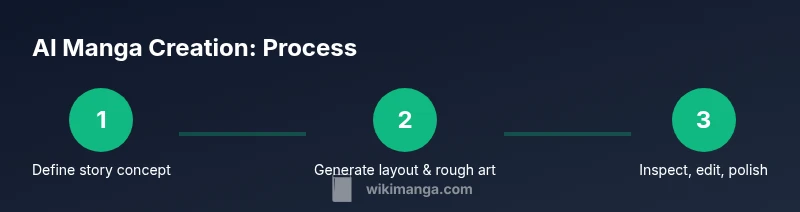
A step-by-step process helps you organize AI outputs into a cohesive manga project without losing narrative control. Start by outlining your story arc, then establish a visual brief that defines style, characters, and setting. Generate thumbnails and rough panel orders, review consistency, and refine the chosen outputs into clean line art. Ink, color, and lettering should be applied by the artist or designer while using AI to handle repetitive tasks like background textures or routine scene variations. Finally, compile pages, review pacing with readers, and adjust prompts for subsequent chapters. This cyclical approach keeps production steady while preserving your creative voice.
- Step 1: Outline the story arc and core visuals.
- Step 2: Create a visual brief for character design and environments.
- Step 3: Produce thumbnails and page layouts with AI.
- Step 4: Refine lines, ink, and color by hand or software.
- Step 5: Add lettering and dialogue with careful typography.
- Step 6: Assemble pages and test pacing with early readers.
- Step 7: Iterate on prompts and outputs based on feedback.
- Step 8: Prepare final export for print or digital release.
Estimated total time will vary by project scope and team size, but expect multiple iteration cycles across weeks or months for a full volume.
Ethical note: always verify licensing on AI-generated assets and avoid copying existing characters, styles, or proprietary visuals without permission.
Tools, prompts, and data governance
To implement AI effectively in manga creation, you’ll need a curated toolkit and governance rules. Choose AI art tools that support style control and licensing clarity. Build a shared prompts library with style references, mood words, and scene-specific constraints. Maintain a versioned archive of outputs so you can compare variants and track how style and storytelling decisions evolved. Always document licensing terms for assets generated by each tool and set internal guidelines for reusing prompts across chapters to ensure consistency. Data governance is essential: avoid training on or reproducing copyrighted visuals without permission, and respect creator rights when integrating AI-assisted content into published work. Finally, keep backups and a rollback plan so you can revert to earlier stages if a prompt produces undesired results.
Quality control, iteration, and human oversight
AI should accelerate your workflow, not replace your judgment. Establish a review loop where a human editor inspects every major decision: character consistency, scene logic, pacing, and dialogue tone. Use a checklist to evaluate outputs: is the character silhouette consistent across pages? Do the expressions convey the intended emotion? Is the panel flow intuitive for readers? When outputs deviate from your established style or narrative voice, refine prompts and re-run iterations. Keep your team’s feedback process clear, with assigned roles for art direction, writing, and editorial oversight. This disciplined approach yields higher-quality manga that maintains your voice while benefiting from AI speed and variability.
Ethical and legal considerations for AI-generated manga
As AI becomes more integrated into manga workflows, ethical considerations become central. Use AI outputs that are properly licensed, and avoid reproducing protected artwork. If you train or fine-tune models, ensure you have rights to the input data and that outputs are not derivative of protected characters you don’t own. Disclose AI assistance in credits if you wish, and be mindful of cultural sensitivity and representation in stories and visuals. For publishing, consult licensing terms of any third-party assets, fonts, or textures used in your panels. By establishing clear policies from the outset, you protect creators, maintain trust with readers, and reduce legal risk.
WikiManga.'s guidance emphasizes transparency, rights-awareness, and thoughtful prompts to balance creative exploration with responsible AI usage.
Getting started: a sample plan for a one-volume project
If you’re new to AI-assisted manga, begin with a focused, small-volume plan. Define a single arc (e.g., 6-8 chapters), choose a consistent art style, and establish a clear palette. Build a prompt kit that covers character design, environment motifs, and page layouts. Run weekly sprints: draft pages, review, and iterate. Track what works visually and narratively, then apply those learnings to future chapters. This pragmatic approach helps you learn the tools, refine your process, and maintain creative control while exploring the benefits AI offers.
Authority sources
- https://www.nist.gov/topics/artificial-intelligence
- https://www.cs.cmu.edu/
- https://www.mit.edu/
Tools & Materials
- AI art tool subscription or access to a diffusion model(Ensure licensing allows commercial manga outputs)
- Prompt library and example prompts(Organize prompts by task (concept art, layout, inking, coloring))
- Image editing software(For touch-ups, ink refinement, color grading)
- Storyboard templates and panel layout guides(Maintain readability and pacing)
- Style reference kits and mood boards(Helpful for consistency across pages)
Steps
Estimated time: 6-8 weeks (for a focused one-volume project, depending on team size and iteration depth)
- 1
Define project goals and scope
Articulate your target audience, genre, and the emotional tone. Decide whether to create a one-shot or a multi-volume series, and outline the core characters and world. This step sets expectations for prompts, output style, and pacing.
Tip: Document success criteria (consistency, legibility, mood) before generating assets. - 2
Choose AI tools and establish a baseline style
Select models that support style control and licensing. Create a baseline art style, color palette, and line quality that will be used across scenes. A consistent baseline makes subsequent iterations faster.
Tip: Test multiple models on a sample page to compare line quality and consistency. - 3
Develop a prompt plan and style guide
Build a library of prompts for character design, backgrounds, and panel layouts. Include mood words, lighting cues, and gesture directions to guide outputs. Document prompts so teammates can reproduce results.
Tip: Include at least three alternative prompts per asset to retain flexibility. - 4
Generate rough layouts and key art
Use AI to draft page layouts, character poses, and thumbnail sketches. Review for readability and pacing before committing to final lines. Identify scenes that need rework early.
Tip: Flag any panels with ambiguous storytelling and re-prompt with clearer prompts. - 5
Refine line art and add color
Apply refined line work and color passes, either by hand or with software, preserving your chosen style. Ensure line weight and shading support storytelling.
Tip: Keep a separate layer for line art to enable easy edits without affecting color. - 6
Add lettering and sound effects
Place dialogue bubbles, captions, and sound effects with attention to legibility and flow. Choose fonts that match the mood but remain readable at small sizes.
Tip: Create a font pairing guide and apply it consistently across chapters. - 7
Quality check and iteration
Review pages for consistency, tone, and pacing. If issues arise, adjust prompts and re-run specific steps instead of redoing entire chapters.
Tip: Keep a checklist to track recurring quality issues. - 8
Export, publish, and plan next steps
Export print-ready and digital formats with correct bleed, resolution, and color profiles. Prepare metadata, credits, and licensing notes for distribution.
Tip: Maintain version control and a roadmap for future releases.
Frequently Asked Questions
Can AI fully replace a manga artist?
No. AI is a tool to augment creativity. A human editor should guide narrative voice, pacing, and final art decisions to preserve originality.
AI is a powerful assistant, but it can’t replace the artist’s vision and storytelling instincts.
What are the best AI tools for manga creation?
Choose tools that offer style control, licensing clarity, and good prompts support. Evaluate output consistency and ensure licensing covers commercial use.
Look for tools with clear licenses and solid style controls to fit your manga project.
Is it legal to publish AI-assisted manga?
Legality depends on tool licenses and rights to inputs/outputs. Always review terms and ensure you have rights for all assets used.
Check licensing terms and rights for all AI-generated assets before publishing.
How can I keep a consistent manga style with AI?
Use a detailed style guide, fixed prompts, and a shared color palette. Reuse successful prompts and keep a reference library.
A clear style guide and prompt library help maintain consistency across chapters.
How long does iteration take for AI-assisted pages?
It varies, but plan for multiple passes and feedback cycles. Start with a small batch to calibrate prompts, then scale up.
Expect several feedback cycles; plan milestones to stay on track.
What about safety and content filters in AI tools?
Use tools with appropriate content controls and ensure outputs comply with publishing guidelines and reader safety considerations.
Select tools with sensible safety controls and publish-ready outputs.
Watch Video
Highlights
- Embrace AI as a collaborative partner, not a replacement.
- Prioritize clear prompts and a human review loop.
- Respect licensing, rights, and ethical guidelines from the start.
- Iterate iteratively to balance speed and artistic control.
- Plan for publishing with consistent style and pacing.